Showing posts with label Data loss. Show all posts

ODIN - A free open source disk imager

ODIN is a utility for easy backup of hard drive volumes or complete hard drives under Windows. A disk image can be created or restored. Only used clusters can be backuped, compression on the fly is possible. It runs under 32-Bit Windows Operating Systems.
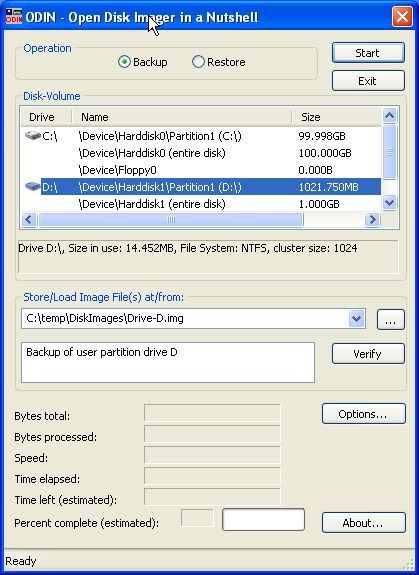

How many hours did you spend in setting up your Windows system? Setting up the operating system, installing programs, customizing to your personal needs. Do you want to be protected against hard disk failures, viruses or other malware? Just restore your system within minutes. Why spend money for a commercial solution? ODIN supports snapshots can be run from command line or with a GUI and runs on 32-Bit and 46-Bit operating systems.


New Version 0.32 Beta released!
Version 0.32 is a bugfix release to 0.31. New Features of version 0.3 are:

Learn How to recover inaccessible data from damaged hard disk in Windows XP.

In Windows operating system, there exists certain system files which are used to boot the system.

These files acccomplish various type of tasks like suggesting which type of operating system to select to boot, partition to access, etc. Nevertheless, this practice fails to occur when these system files are corrupt due to any miscellaneous reason such as virus infections, hard disk damage, abrupt or unplanned system shutdown, etc. Such situations call for reinstalling the Windows system but for that you would need to recover the lost data. That is made easy using a third-party hard disk recovery software that would help you in doing so.

Let us consider a situation in which you start your Windows XP system but it fails to boot properly. It stops showing a black screen and may display either of the following error messages:

STOP: C0000221 unknown hard error
Path\File_name
STOP: 0xC0000221 unknown hard error
C:\Winnt\System32\Ntdll.dll (or another specific file or driver)
STOP: 0xC0000221 STATUS_IMAGE_CHECKSUM_MISMATCH
Path\File_name

Cause: 
There could be the following reasons for this situation at the system startup:

The files mentioned in the error messages are either missing or damaged.
You have installed an inappropriate system driver that is incompatible with the system.
You may have installed an Iomega ZIP drive on the same IDE (Integrated Device Electronics) cable as the hard disk drive.

Resolution:

You can perform the following methods to resolve this problem:

How Can Your Business Benefit by Using Online Storage Solutions?

A few years ago we could never have imagined the technological advances we have today. We have all of the tools at our fingertips to make our lives better. Technology allows us to acquire knowledge, cure disease, communicate, play, conduct business, and more. Consider working online. There are literally thousands of applications designed to make online work easier. How do you choose? How can you possibly wade through them all to find what is the most essential?

  
Storytime:
Picture this scenario. You’re at home finalizing a presentation in PowerPoint. It is extremely important and you have spent hours getting it right. You make some significant changes, carefully saving your work to your USB. In the morning, you head in to the office and stride confidently into the conference room, ready to dazzle your boss, and… discover that you didn’t bring the USB with those last critical changes with you to work. This could be very damaging to your career.

Now imagine that you could save this scenario. What if you had access to the data without the USB? What if you could use a few simple steps and have the latest version of your work right now? Technology could have saved this entire situation with a single application.
 
Copyright © Data Recovery Guru. Design By Best Website Design Tested by Blogger Templates | Business Credit Cards
Buy Traffic and Templates On Sales